The Oxygen Review Center v.2.1 is now available and includes the features described below:
Annotations panel
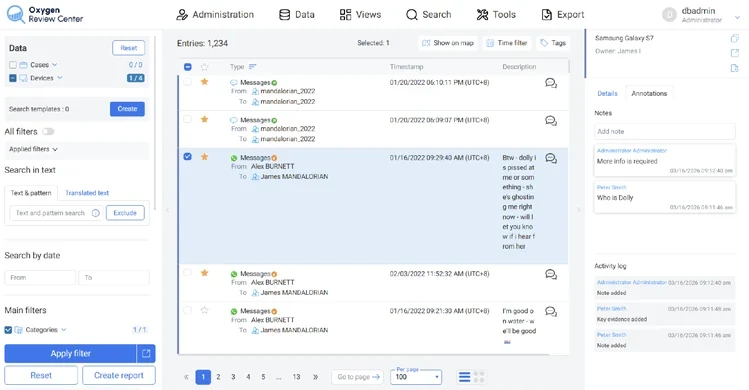
We’ve made collaboration easier by introducing the Annotations panel, available in the right sidebar of every section of Oxygen Review Center. It includes two key components:
- Users can now add multiple notes to each entry they review. Every note is automatically labeled with the username and a timestamp, making it easier to track contributions.
- A detailed activity log shows who added or removed key evidence flags, tags, or notes, ensuring full visibility into all updates.
Annotations transfer from Oxygen Review Center
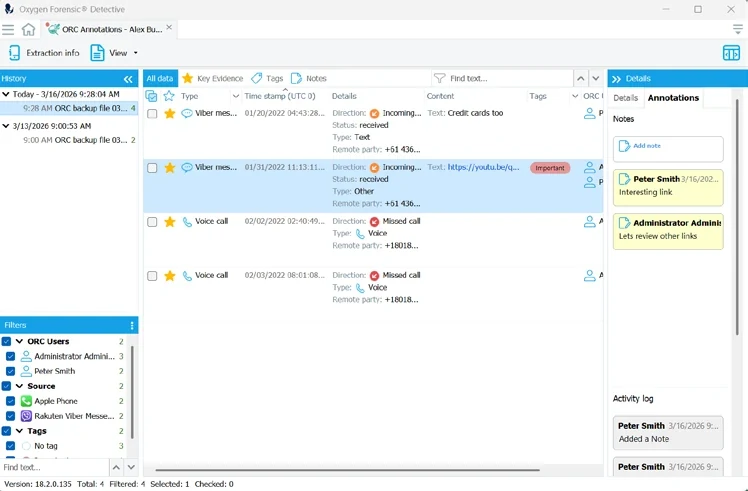
You can now transfer key evidence, tags, and notes created collaboratively in Oxygen Review Center to Oxygen Forensic® Detective or Oxygen Remote Explorer. To transfer annotations, export the data as a file from the Devices or Cases pages. The exported file will appear in the Export section. You can then upload it to Oxygen Forensic® Detective or Oxygen Remote Explorer. All entries with key evidence, tags, and notes will appear in a dedicated ORC Annotations section. There, you can filter by reviewer, source, or tag, see which users added annotations, and when each annotation was created.
Facial categorization data review
If facial categorization is used in Oxygen Forensic® Detective, the results are now transferred to Oxygen Review Center. They can be reviewed using the Faces filter in the Files section. You can also navigate to recognized faces from the Dashboard.
Translated Speech to Text results review
When data is transcribed and then translated in Oxygen Forensic® Detective or Oxygen Remote Explorer, the translated transcribed results are now available for review in the Files section of Oxygen Review Center.
Social Graph filters
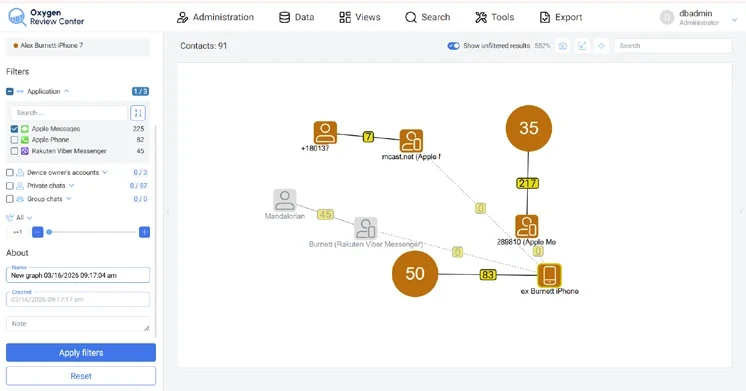
We have added multiple filters to simplify working with Social Graph. You can filter communications by application, account, contact, group, and number of communications in the Social Graph. We have also added search functionality to the Social Graph grid and the Communications panel.
Other improvements
Several other improvements have been added:
- The option to select HTTP or HTTPS during software installation
- A direct link to the Customer Area in the Admin Settings menu
- The password setup window during installation now has the password visibility toggle and confirmation field