The latest update to our flagship solution is here, Oxygen Forensic® Detective v.18.3
Key features include:
- Upgraded Image Categorization engine
- App extraction via USB and Wi-Fi using Android Agent
- Enhanced support for MTK-based devices
- Link recognized faces to existing contacts
- Saving disk and partition images in E01 format on running GNU/Linux systems
For a full list of updates, refer to the “What’s New” file in the Oxygen Forensic® Detective “Options” menu.
Data Analysis
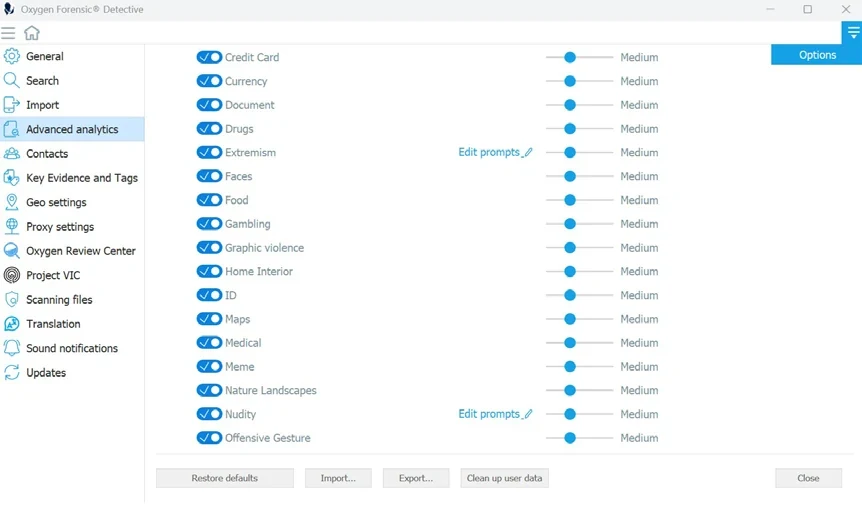
Upgraded Image Categorization engine
Images can now be categorized using our enhanced engine, delivering improved accuracy and better results across most categories. To get started, download and install the Image Categorization add-on from your customer area. This new engine also introduces support for additional categories that were not available previously:
- Animals
- Faces
- Food
- Home Interiors
- License Plates
- Nature Landscapes
- Text
- Urban Scenes
We have also added configurable prompts for the following categories: Child Abuse, Nudity, Pornography, and Extremism. The enhanced image categorization engine supports both CPU and GPU execution, with GPU providing significantly higher performance.
Mobile Forensic Updates
App extraction via USB and Wi-Fi using Android Agent
We have incorporated the ability to extract app data via USB and Wi-Fi using Android Agent. The list of supported apps is as follows:
- Chrome
- Discord
- Samsung Internet Browser
- Signal
- Slack
- Telegram
- Telegram Web
- WhatsApp Business
Previously such extraction was supported by the Android Agent Manual method.
Enhanced support for MTK-based devices
We have added support for Android devices based on the following MTK chipsets: Mediatek MT6789, MT8781, MT6886, MT6983, MT6985 and MT6895. Supported device models include Nothing Phone (2a), OnePlus Nord 3, POCO M5, Realme 10, Motorola Moto G72, vivo V27, vivo T2 Pro 5G, OnePlus 10R and others.
Brute Force Module Updates
We have incorporated the ability to find passcodes to the following apps:
- Telegram for macOS
- Threema
Computer Artifacts Updates
Saving disk and partition images in E01 format on running GNU/Linux systems
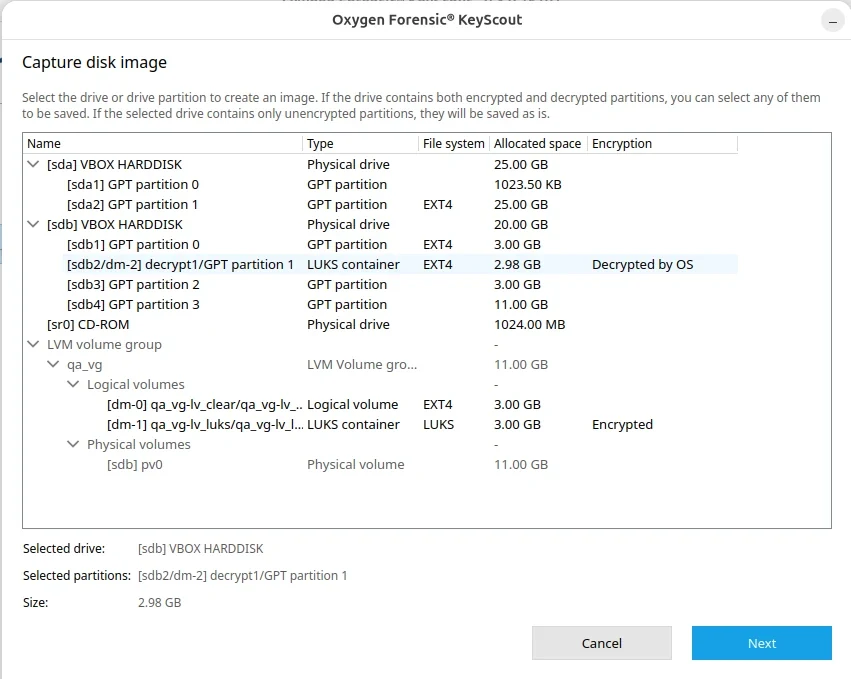
Now you can save disks and partitions in E01 format on running GNU/Linux systems. To create an image of a disk or partition, you can choose one of the following options:
- Physical disk. When selected, all partitions on the disk are automatically included, except for the Logical Volume Group
- Any partition of a physical disk that does not include a Logical Volume Group
- Logical Volume Group. Only one logical volume can be selected.
Other enhancements
Several functionality enhancements have been added:
- Search for GIF files, 7-ZIP and RAR container files by file signature
- Extraction of GIF files and 7-ZIP and RAR container files from unallocated space of NTFS partitions using file carving
- Search for email files by PST and OST extensions
- The ability to automatically detect the Windows account type and select the appropriate decryption method for protected data
New artifacts
The following new computer artifacts are supported for extraction:
- Login Records data from GNU/Linux
- Privilege escalation data from GNU/Linux
- Authentication logs from GNU/Linux
- Firewall rules data from GNU/Linux
- Cloud-init configuration data from GNU/Linux
- Samsung Internet Beta data from Windows
General Updates
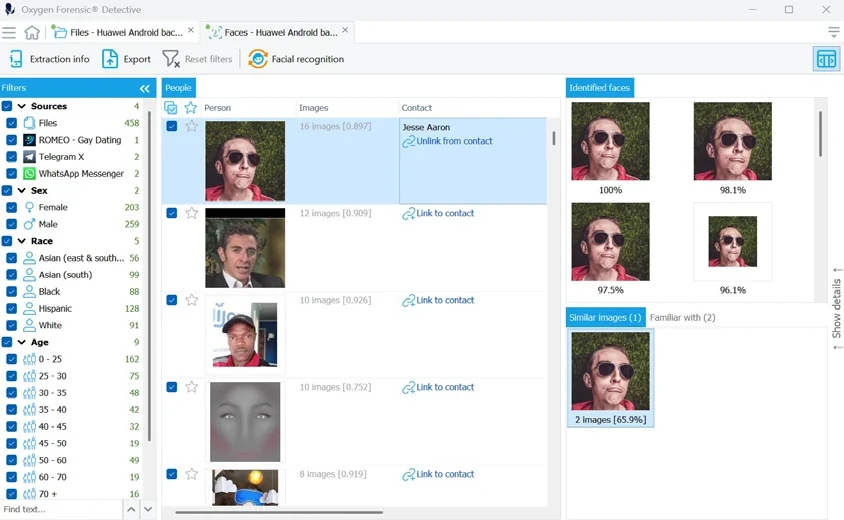
Link recognized faces to existing contacts
We have added the ability to link recognized faces with existing contacts. In the Faces section, within the People block, a new Contact column has been added with a “Link Contact” option. Clicking this option allows you to select a contact to associate with the recognized face.
Resetting program data
A new “Reset Program Data” option has been added to the General settings. This feature opens a management window that allows investigators to selectively remove internally generated application data, including hash sets, face recognition sets, user tags, hex lists, keyword sets, and other custom program configurations.
This operation only affects investigator generated metadata and application level settings created during forensic examinations. Original forensic evidence and acquired source data remain unchanged and are not modified by this process.
The feature provides a controlled method for clearing previously created analytical datasets and custom configurations when they are no longer required, allowing investigators to return the application to a clean operational state.
Interested in trying Oxygen Forensic® Detective v.18.3? Request a trial license.