The latest update to our flagship solution is here, Oxygen Forensic® Detective v.18.2.
Key features include:
- WhatsApp chat extraction via iOS Agent public data method
- Geolocations section
- Malware scan in KeyScout
- File-to-app linking
- Key Evidence enhancements
For a full list of updates, refer to the “What’s New” file in the Oxygen Forensic® Detective “Options” menu.
Mobile Forensic Updates
Enhancements of the iOS Agent public data method
We have incorporated several enhancements to the iOS Agent functionality for extracting publicly available data:
- Added the ability to manually select and extract exported chats from WhatsApp and WhatsApp Business. Chats can be exported either with media files or without them. All iOS devices running iOS 15.1 and later are supported.
- Added the ability to manually select and extract files and folders. In a single request, you can download files from one folder or an entire folder at once. All iOS devices running iOS 12.0 and later are supported.
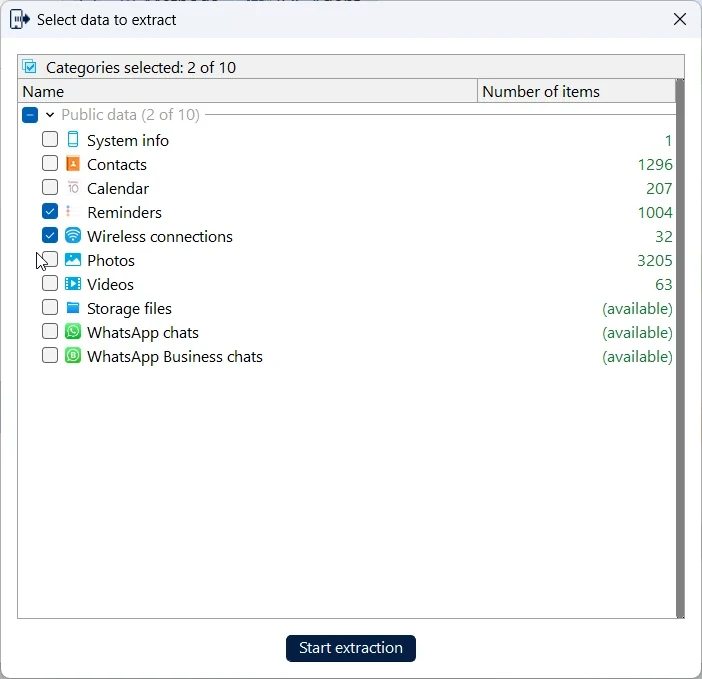
- Added functionality for extracting reminders and wireless connections data. All iOS devices running iOS 12.0 and later are supported.
Brute Force Module Updates
We have incorporated the following improvements to the module:
- We have added the ability to brute-force passwords for encrypted Samsung Smart Switch backups.
- Attacks are now automatically paused when the user-defined critical GPU temperature is reached, and a corresponding notification is displayed in the attack window.
- We have improved the brute-force algorithm for Android FDE images.
- We have improved the ability to utilize multiple GPUs simultaneously to brute-force passwords on Android FDE and FBE images.
Computer Artifacts
Malware scan
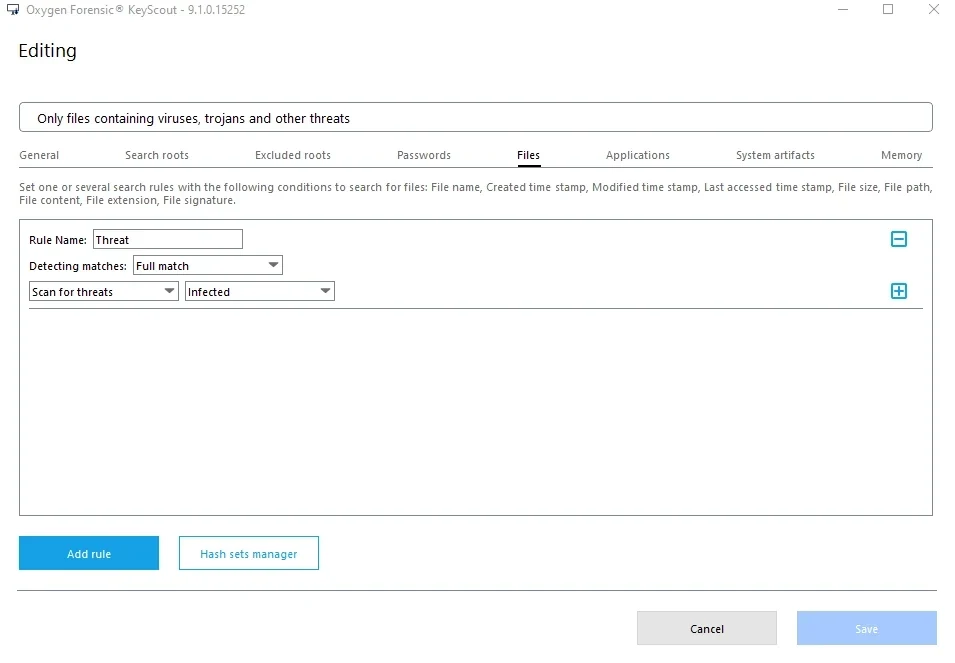
We have implemented the ability to scan disk images and physical drives for malware in KeyScout. There are two usage scenarios:
- Select a corresponding checkbox on the General tab of KeyScout Profile settings. Files containing threats will be flagged among the other extracted files.
- Select the corresponding search condition on the Files tab of KeyScout Profile settings. In this case only files containing threats will be found and displayed.
Other enhancements
Several other functionality enhancements have been added:
- Search for PNG files by file signature
- Extraction of PNG files from unallocated space on NTFS partitions
- Calculation of SHA3-256 hashes for disk images
- Ability to specify investigator and extraction details in the new Case Details tab
- Decryption of Microsoft Account data for Windows Hello accounts
New artifacts
The following new computer artifacts are supported for extraction:
- Event logs of the atop utility from GNU/Linux
- Voice Memos data from macOS
- Zoom Workplace data from GNU/Linux
- Obsidian data from Windows, macOS, and GNU/Linux
- Program Compatibility Assistant data from Windows
Import Updates
We have included several import enhancements:
- Added the ability to import and decrypt E01 images of all previously supported encrypted SD cards, including those formatted as Android Adoptable Storage, with a FAT32 file system
- Added the ability to perform selective file analysis when importing memory card dumps
- Updated the import mechanism to support extended timestamps from GrayKey extractions
- Updated the ability to import and parse the binary keychain format for GrayKey extractions
- Updated the import and parsing of data from Facebook Warrant returns
Cloud Forensic Updates
Data extraction from Google Authenticator
You can now extract data from Google Authenticator using a login and password or token. The extracted data will include the account owner’s details and secret keys.
General Updates
Geolocations section
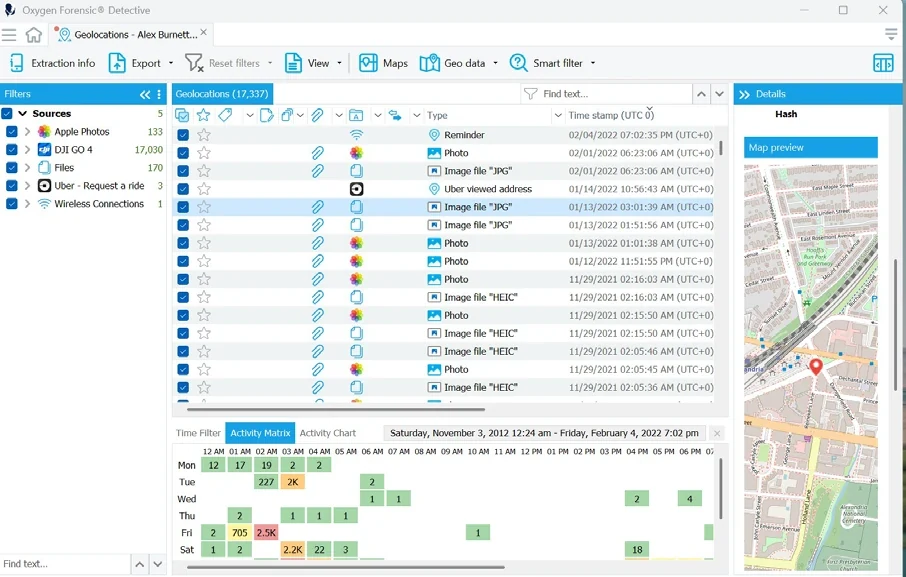
We’ve introduced a new Geolocations data section that allows you to analyze all location-related information in one place. The data can be filtered using different criteria, including accounts, groups, contacts, and sources. You can also retrieve addresses from geographic coordinates. Additionally, each geolocation now includes a map preview on the Details side panel. Lastly, coordinates extracted from media file metadata are automatically labeled as the device owner’s geodata when the files are stored in standard media directories within the extraction.
Key Evidence enhancements
We have added the ability to mark all messages of a selected contact as Key Evidence.
Two new options have been added to the contact’s context menu in the Contacts section: mark communication as Key Evidence and unmark communication as Key Evidence.
File-to-app linking
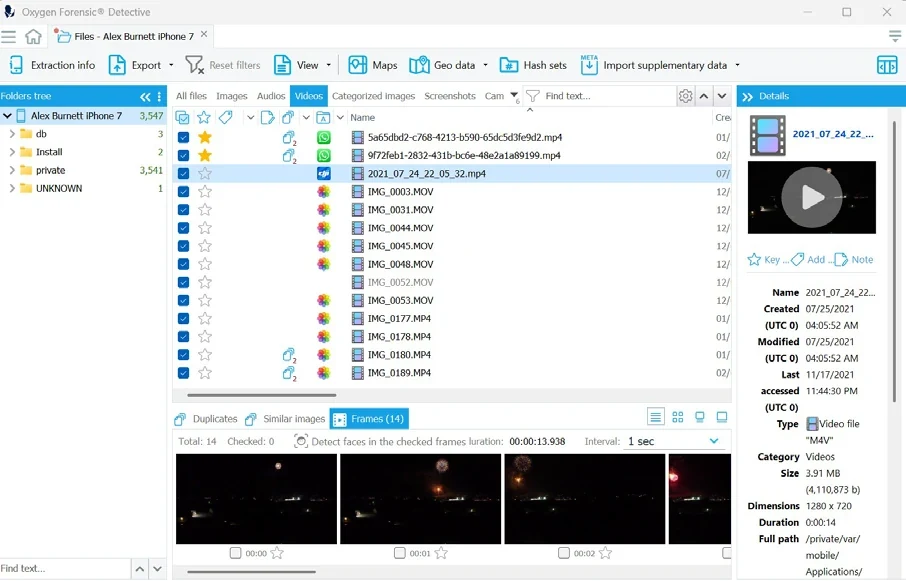
Files are now automatically linked to their source application records for easier tracing and context. In the Files section, an Application column has been added. It displays the application icon if the given file is present in that application. A link to the application is displayed in the sidebar. When you click the link, you are redirected to the application section.
Support for OpenCellID database
We have added support for OpenCellID. This feature allows you to analyze network coverage around the location of an event. You can download cellular tower databases directly from the OpenCellID website by registering there and obtaining a token.
Other updates
We have introduced other general features across the software:
- Added the ability to filter files and exclude system files for saving in OFBR format
- Implemented tag separation by origin into User tags and Image categorization tags
- Added a new Coordinates column with a pop-up filter in the Messages section
- Added new filters to the advanced search settings in the Search section
- Added cryptocurrency search at data import
- Added the ability to translate data from Burmese, Kannada, Khmer, Malayalam, Marathi, Mongolian, Odia, Somali, and Tagalog languages.
Interested in trying Oxygen Forensic® Detective v.18.2? Request a trial license.